
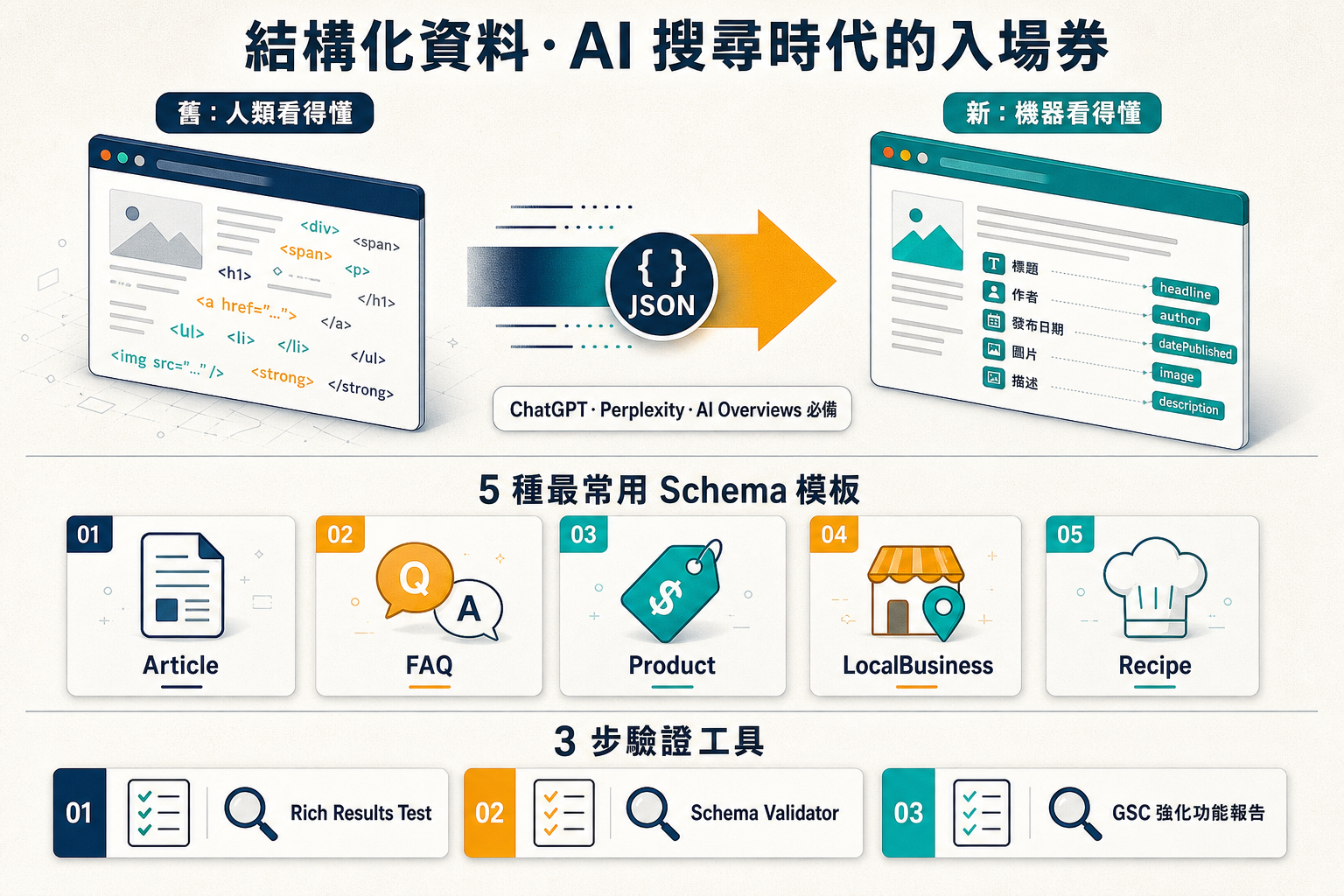
2026 年了、AI 搜尋崛起後 結構化資料變成必需品
結構化資料(Structured Data)在 2010 年代就已經是 SEO 進階優化、但 2024-2026 年 ChatGPT、Perplexity、Google AI Overviews 崛起後、它從「加分項」變成「必備項」 — 因為 AI 在判斷「該引用誰」時、越來越依賴結構化資料。沒有結構化資料的網頁、不會被 AI 看見。
本文用最白話方式解釋:什麼是結構化資料 → 為何 AI 需要它 → 5 種你今天就能用的模板 → 怎麼驗證。
什麼是結構化資料?60 秒入門
想像你打開一個食譜網頁。人類看到「番茄炒蛋 / 作者: 阿基師 / 4 人份 / 30 分鐘 / 食材: 番茄、雞蛋」一目了然。但 Google 機器人看到的是一堆 `
` 標籤、根本分不清「番茄」是食材、是文章標題、還是廣告。
結構化資料就是給機器看的「標籤」 — 用 JSON-LD 告訴它「這是 Recipe、作者是阿基師、4 人份、需要 30 分鐘、食材包含番茄與雞蛋」。Google 才知道:「啊這是食譜!」於是在搜尋結果展示「Recipe Rich Snippet」(含照片、星評、烹飪時間) — 你的 CTR 立刻提升 40%。
為什麼 2026 年突然變這麼重要?因為 AI 搜尋
傳統 Google 搜尋:用戶輸入關鍵字、看 10 條藍色連結。即使沒有結構化資料、用戶還會點進你的頁面、自己讀。
AI 搜尋(ChatGPT、Perplexity、Google AI Overviews):用戶問問題、AI 「替他讀」5-10 個來源後給答案。AI 沒時間「自己理解」每個網頁、它需要結構化資料告訴它「這頁的精華是 XXX」。沒結構化資料 = AI 不引用你 = 你不存在於 AI 搜尋結果。
5 種最常用模板(複製貼到 <head> 就能用)
模板 1:Article(部落格文章)
<script type="application/ld+json">
{
  "@context": "https://schema.org",
  "@type": "Article",
  "headline": "你的文章標題",
  "description": "160 字以內的摘要",
  "author": {
    "@type": "Person",
    "name": "何佳勳",
    "url": "https://atmarketing.tw/about-2"
  },
  "publisher": {
    "@type": "Organization",
    "name": "圭話行銷",
    "logo": {
      "@type": "ImageObject",
      "url": "https://atmarketing.tw/logo.png"
    }
  },
  "datePublished": "2026-06-25",
  "image": "https://atmarketing.tw/og.png"
}
</script>
模板 2:FAQ(問答頁)
<script type="application/ld+json">
{
  "@context": "https://schema.org",
  "@type": "FAQPage",
  "mainEntity": [{
    "@type": "Question",
    "name": "問題 1?",
    "acceptedAnswer": {
      "@type": "Answer",
      "text": "答案 1"
    }
  }, {
    "@type": "Question",
    "name": "問題 2?",
    "acceptedAnswer": {
      "@type": "Answer",
      "text": "答案 2"
    }
  }]
}
</script>
注意:Google 從 2023 年 8 月限制 FAQ Rich Snippet 只給「政府/衛福部/醫學等權威網站」展示 — 一般網站不會展示。但 AI 搜尋(ChatGPT、Perplexity)仍會抓 FAQ 結構、引用率高。所以仍建議加。
模板 3:Product(電商商品頁)
<script type="application/ld+json">
{
  "@context": "https://schema.org",
  "@type": "Product",
  "name": "商品名稱",
  "image": "https://yoursite.com/product.jpg",
  "description": "商品描述",
  "brand": { "@type": "Brand", "name": "你的品牌" },
  "offers": {
    "@type": "Offer",
    "url": "https://yoursite.com/product",
    "priceCurrency": "TWD",
    "price": "1280",
    "availability": "https://schema.org/InStock"
  },
  "aggregateRating": {
    "@type": "AggregateRating",
    "ratingValue": "4.7",
    "reviewCount": "127"
  }
}
</script>
模板 4:LocalBusiness(餐廳/店家/實體服務)
<script type="application/ld+json">
{
  "@context": "https://schema.org",
  "@type": "Restaurant",
  "name": "店名",
  "image": "https://yoursite.com/store.jpg",
  "address": {
    "@type": "PostalAddress",
    "streetAddress": "忠孝東路四段 100 號",
    "addressLocality": "臺北市",
    "postalCode": "106",
    "addressCountry": "TW"
  },
  "telephone": "+886-2-1234-5678",
  "openingHours": "Mo-Fr 11:00-22:00",
  "priceRange": "$$",
  "servesCuisine": "台菜"
}
</script>
模板 5:Recipe(食譜)
<script type="application/ld+json">
{
  "@context": "https://schema.org",
  "@type": "Recipe",
  "name": "番茄炒蛋",
  "author": { "@type": "Person", "name": "阿基師" },
  "image": "https://yoursite.com/recipe.jpg",
  "recipeYield": "4 人份",
  "cookTime": "PT15M",
  "recipeIngredient": ["番茄 3 顆", "雞蛋 4 顆", "鹽 1 茶匙"],
  "recipeInstructions": [
    { "@type": "HowToStep", "text": "番茄切塊" },
    { "@type": "HowToStep", "text": "雞蛋打散" }
  ]
}
</script>
3 個驗證工具(加完一定要測)
- Google Rich Results Test(search.google.com/test/rich-results)— 看你的頁面能不能展示 Rich Snippet
- Schema.org Validator(validator.schema.org)— 看你的 JSON-LD 語法對不對
- GSC「強化功能」報告(Google Search Console → 強化功能)— 看 30/90 天實際效果
3 個常見誤區
誤區 1:抄競爭對手的結構化資料就好
大忌 — 結構化資料必須跟頁面內容「一致」。如果你頁面沒有 FAQ、但你加了 FAQ schema 假裝有、Google 會視為「結構化資料垃圾訊號」、可能會降權。每加 1 種 schema、頁面上必須有對應的內容呈現。
誤區 2:放在 <body> 而非 <head>
JSON-LD 雖然技術上可以放 <body>、但放 <head> 是 Google 官方建議、被解析的成功率較高。
誤區 3:同 1 頁加多個重複的 schema
例如 1 個產品頁、加了 2 個 Product schema(價格不同)— Google 會混亂、可能 2 個都不用。1 頁 1 個主要 schema(可以另加 BreadcrumbList、Organization 等輔助)。
結論:今天就加 5 條結構化資料、6 月底前看到效果
結構化資料的 ROI 是「立刻可見」— 加完當天、Google Rich Results Test 就能驗證。30 天內、CTR 會明顯提升。90 天內、AI 搜尋的引用率會上升。對於 2026 年想被 AI 搜尋看見的品牌、結構化資料不是 SEO 加分項、是「能不能在 AI 時代存活」的入場券。
今天就動手 — 把 5 個模板裡至少 1 個加到你的網站、然後用 Google Rich Results Test 驗證。30 天後回來看數據 — 你會感謝今天的自己。
常見問題
結構化資料、Schema.org、JSON-LD、Microdata 這幾個有什麼不同?
簡單分層:「結構化資料」是大概念(structured data)— 給機器看的網頁標籤。「Schema.org」是規範(schema)— Google/Microsoft/Yahoo 一起制定的「該怎麼標」字典。「JSON-LD」「Microdata」「RDFa」是 3 種「怎麼寫」的格式 — JSON-LD 用 JSON 寫(最推薦、Google 官方建議)/Microdata 用 HTML attribute 寫(舊版方法、不推)/RDFa 用 XML 風格(學術界用)。2026 年中小品牌只需要學 JSON-LD 就好。
結構化資料會直接讓我排名上升嗎?
不會直接提升排名 — 但會大幅提升「點閱率」與「AI 引用率」。Google 官方明確說:結構化資料不是排名因素、但能讓你的搜尋結果展示「Rich Snippets」(評分星星、FAQ 摺疊、商品價格等)— 這些會讓 CTR 平均提升 30-58%(依產業)。對 AI 搜尋(ChatGPT、Perplexity)更重要 — 它們更依賴結構化資料判斷「該引用哪個來源」。所以結構化資料的 ROI 不是「排名」、是「點擊」與「能見度」。
如果我用 WordPress、Shopify、Wix 這類平台、還需要自己加結構化資料嗎?
看情況。WordPress 用 Yoast/RankMath 外掛、Shopify 用內建 SEO、Wix 用內建工具 — 都會自動產出「基本」結構化資料(如 Article、Product)。但「進階」標籤(如 HowTo、FAQ、Recipe)通常要自己加。建議:(1)先用 Google Rich Results Test 測你的頁面、看現有的標籤夠不夠;(2)缺哪個就用本文範本補哪個;(3)每季用 GSC「強化功能」報告檢查實際效果。